
If you run a business in Latin America, you have probably run into this wall: your US or European clients want to pay you in USD, but you do not have a US entity, and setting one up feels like a project in itself.
The conventional advice is to incorporate a Delaware or Wyoming C-Corp. That means legal fees, registered agents, annual filings, a US bank account, and months of setup time before you can accept your first dollar.
There is a faster path. Yativo’s USD virtual accounts let LATAM-based businesses and individuals receive USD from US clients via ACH, Fedwire, or SWIFT, without needing a US entity. Once funds arrive, they are automatically converted to USDC, which you can either withdraw to an external wallet or use to fund local currency payouts to your LATAM bank account.
This guide explains exactly how it works, what the requirements are, and how to integrate it via API or dashboard.
The Problem: Getting Paid in USD Without a US Company
Latin American businesses face a structural payment problem when working with US clients.
Your US client can easily pay via ACH or wire transfer, but they need a US bank account or routing number to send to. Without a US entity, you cannot open a US bank account through traditional channels. And asking international clients to send SWIFT wires to a foreign bank account adds friction, costs, and delays.
The workarounds most businesses use all come with significant drawbacks:
- Incorporating in Delaware or Wyoming: Legal costs of $1,000+ upfront, annual fees, a registered agent, and tax filing obligations in the US, even if you never operate there
- Asking clients to send SWIFT wires: High fees on both ends, 3-5 day settlement, and FX losses on conversion
- Using freelance platforms as intermediaries: Platform fees of 5-20%, limited to certain business types, and no API access
- Stablecoin wallets only: Works for crypto-native clients, but most US B2B clients pay via ACH or wire
Yativo’s USD virtual accounts solve this without any of those workarounds.
How Yativo USD Virtual Accounts Work
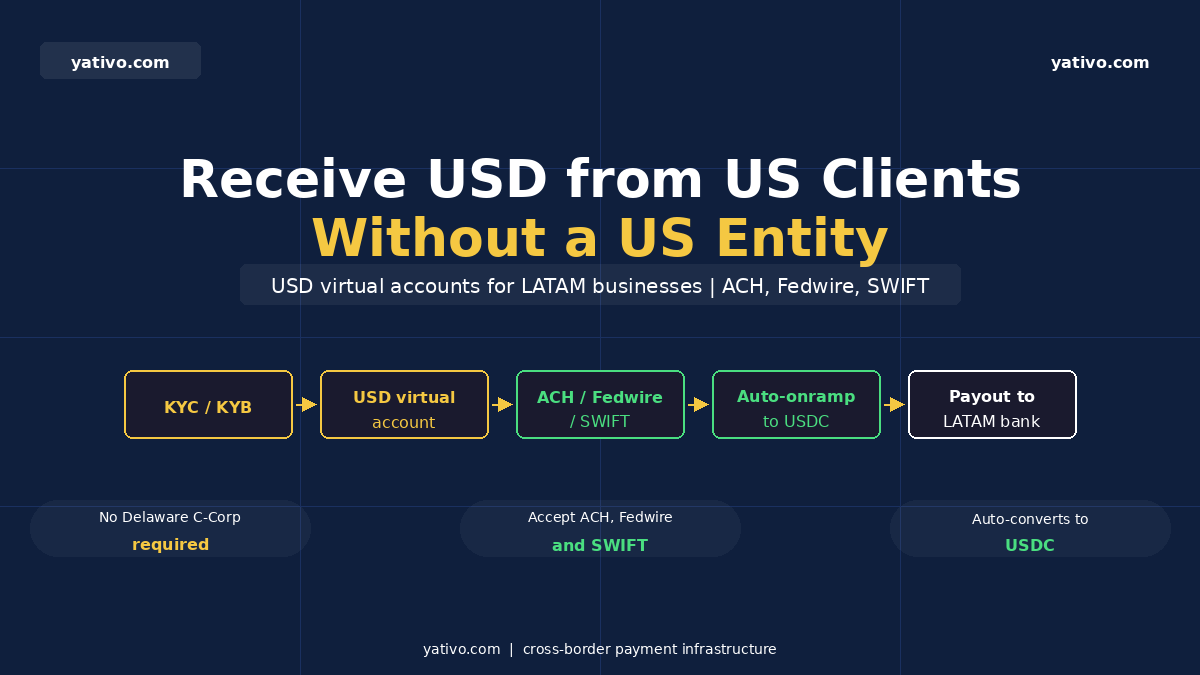
The flow is straightforward:
- Complete KYC (for individuals) or KYB (for businesses) verification
- Once approved, create a USD virtual account via dashboard or API
- Share your virtual account details (US routing number and account number) with your US clients
- Your client pays via ACH, Fedwire, or SWIFT, exactly as they would to any US bank
- Funds are automatically onramped to USDC by Yativo
- You withdraw USDC to your external wallet, or use it to fund local currency payouts to your LATAM bank account via the standard payout flow
Your US client does not need to do anything unusual. They pay a US bank account number via their normal ACH or wire process. The stablecoin conversion and LATAM payout happen entirely on your side.
Two account types are available depending on your use case:
- Account for yourself: Create a single USD virtual account for your own business to receive payments from your clients
- Accounts for your customers: If you are building a platform, you can issue unique USD virtual accounts to each of your customers, so each customer gets their own dedicated account number for receiving payments
Supported Payment Rails
| Rail | Settlement time | Typical use case |
| ACH | 1-2 business days | Regular US B2B payments, payroll, recurring billing |
| Fedwire | Same day | Large or urgent USD payments within the US |
| SWIFT | 2-5 business days | International clients outside the US paying in USD |
Step 1: Complete KYC or KYB Verification
Before creating a virtual account, you need to complete identity verification. Yativo offers two options: submit via API, or use a hosted KYC link.
Option A: Hosted KYC/KYB Link (fastest for individuals and small businesses)
Generate a link and have the applicant complete verification directly:
For individuals:
https://kyc.yativo.com/individual/{customer_id}For businesses:
https://kyc.yativo.com/business/{customer_id}The customer fills in their details, uploads documents, and submits. Yativo reviews and approves. No API integration required for this step.
Option B: KYC API (for platforms onboarding customers programmatically)
For individual KYC:
POST https://kyc.yativo.com/api/individual-kyc/submit
Key required fields for USD virtual account access:
- customer_id, first_name, last_name, email, phone, birth_date, nationality
- residential_address with proof of address document
- identifying_information: passport, national ID, or driver’s license (front image required)
- employment_status, source_of_funds, expected_monthly_payments_usd
- usd_virtual_account: true (required to enable the USD virtual account rail)
For business KYB:
POST https://kyc.yativo.com/api/business-kyc/submit
Key required fields:
- customer_id, business_legal_name, business_type, registration_number, tax_id, incorporation_date
- registered_address and physical_address
- associated_persons: all owners, directors, and signers with ID documents
- documents: business registration, tax document
- extra_documents: articles of association, shareholding structure
- collections_data and payouts_data describing expected payment flows
Full KYC/KYB API documentation: KYC/KYB API Documentation
Step 2: Create a USD Virtual Account
Once KYC/KYB is approved, create the virtual account via dashboard or API.
Via Dashboard
- Log into your Yativo dashboard
- Go to Virtual Accounts
- Click Create Virtual Account
- Select USD (USDBASE) as the currency
- Select the customer or your own account
- Account details (US routing number and account number) are issued within minutes
Via API
POST {{baseUrl}}/api/v1/business/virtual-account/createAuthorization: Bearer YOUR_API_KEY
Request body:
{

  "currency": "USDBASE",

  "customer_id": "your-customer-uuid"

}
Response:
{

  "status": "success",

  "status_code": 201,

  "message": "Virtual account creation in progress",

  "data": {

    "account_id": "va_xxxxxx",

    "account_number": "xxxxxxxxxx",

    "account_type": "savings",

    "currency": "USD",

    "created_at": "2025-05-27T14:45:00Z"

  }

}
The account_number and routing number returned are real US bank account details. Share these with your client exactly as you would share any US bank account for receiving payments.
Full Virtual Accounts API documentation: Virtual Accounts Documentation
Step 3: Receive Funds and Pay Out to Your LATAM Bank
Once your US client makes the ACH, Fedwire, or SWIFT payment to your virtual account:
- Funds arrive in your Yativo USD virtual account
- Yativo automatically converts to USDC
- You can withdraw USDC to your external wallet at any time
- Or use the standard payout flow to send funds to your LATAM bank account in local currency
For step 4, the payout flow is the same as any standard Yativo payout. You specify your LATAM bank account details as the beneficiary, choose the local currency (CLP, MXN, BRL, COP, etc.), and Yativo handles the USDC to local currency conversion and domestic bank transfer.
This means the full cycle looks like this:
US client pays USD via ACH > USD arrives in virtual account > Auto-converted to USDC > You withdraw to your LATAM bank in local currency
Issuing Virtual Accounts to Your Customers (Platform Use Case)
If you are building a platform, marketplace, or SaaS product where your customers also need to receive USD from their own US clients, Yativo lets you issue unique virtual accounts to each of your customers.
Each customer gets their own dedicated US account number. When a payment arrives, it is attributed to that specific customer. You manage all accounts from a single API integration.
The flow is the same: onboard each customer through KYC/KYB, then create a virtual account per customer:
POST /api/v1/business/virtual-account/create

{

  "currency": "USDBASE",

  "customer_id": "individual-customer-uuid"

}
To retrieve all virtual accounts:
GET {{base_url}}/api/v1/business/virtual-accountTo get a specific account:
GET {{base_url}}/api/v1/business/virtual-account/show/{{virtual_account_id}}To get transaction history for an account:
POST {{base_url}}/business/virtual-account/history/{{accountNumber}}Best Practices
Enable usd_virtual_account: true in your KYC submission. This is required in the financial information section of the KYC/KYB form to unlock the USDBASE rail. Without it, the virtual account cannot be created.
Use USDBASE, not USD (deprecated). The USD currency code is deprecated. Always use USDBASE when creating virtual accounts.
Share routing and account number exactly as provided. Your US clients need both the routing number and account number. Treat these the same way you would share any US bank account details.
Use the standard payout flow for LATAM withdrawals. Once you have USDC in your wallet, use Yativo’s standard payout endpoints to send to your local bank account. The payout flow is identical to any other LATAM payout.
For platforms, assign one virtual account per customer. This ensures clean attribution and reconciliation. Each customer’s inbound payments are automatically tracked separately.
Frequently Asked Questions
Do I need a US entity to use Yativo USD virtual accounts?
No. Yativo issues you a US bank account number backed by its own licensed US financial infrastructure. Your business can be incorporated in Chile, Mexico, Colombia, or anywhere else.
What verification is required?
Individual users complete KYC (personal identity, address, ID document). Business users complete KYB (company registration, director and owner verification, business documents). You can submit via API or via the hosted KYC link.
How quickly is the virtual account issued?
Account creation is typically processed within minutes after KYC/KYB approval. The API response confirms when account creation is in progress.
What happens to the USD after it arrives?
Funds are automatically onramped to USDC by Yativo. You can then withdraw USDC to your external wallet, or use it directly to fund local currency payouts to your LATAM bank account.
Can I issue virtual accounts to my own customers?
Yes. If you are building a platform, you can create unique USD virtual accounts for each of your customers. Each customer gets their own dedicated US account number, and all accounts are managed from your single API integration.
Which US payment rails are supported?
ACH (1-2 business days), Fedwire (same day), and SWIFT are all supported.
Start Receiving USD Without a US Entity
If you run a LATAM business working with US clients, Yativo’s USD virtual accounts give you a US bank account number for receiving ACH, Fedwire, and SWIFT payments, without incorporating in Delaware or Wyoming.
Complete KYC/KYB once, create your virtual account, and start sharing your US bank details with clients today.
Book a demo to get started, or try the sandbox to test the full flow before going live.